
AI Agent System Workflow
How Impact Learning's AI agent system works
AI Agent System Workflow
Impact Learning is built on AI agent technology — a system where the AI doesn't just answer questions, but actively works towards your goals. Unlike a simple chatbot, an AI agent follows a continuous cycle: it takes your input, plans an approach, decides on the next action, executes it, observes the result, and iterates until the goal is met.
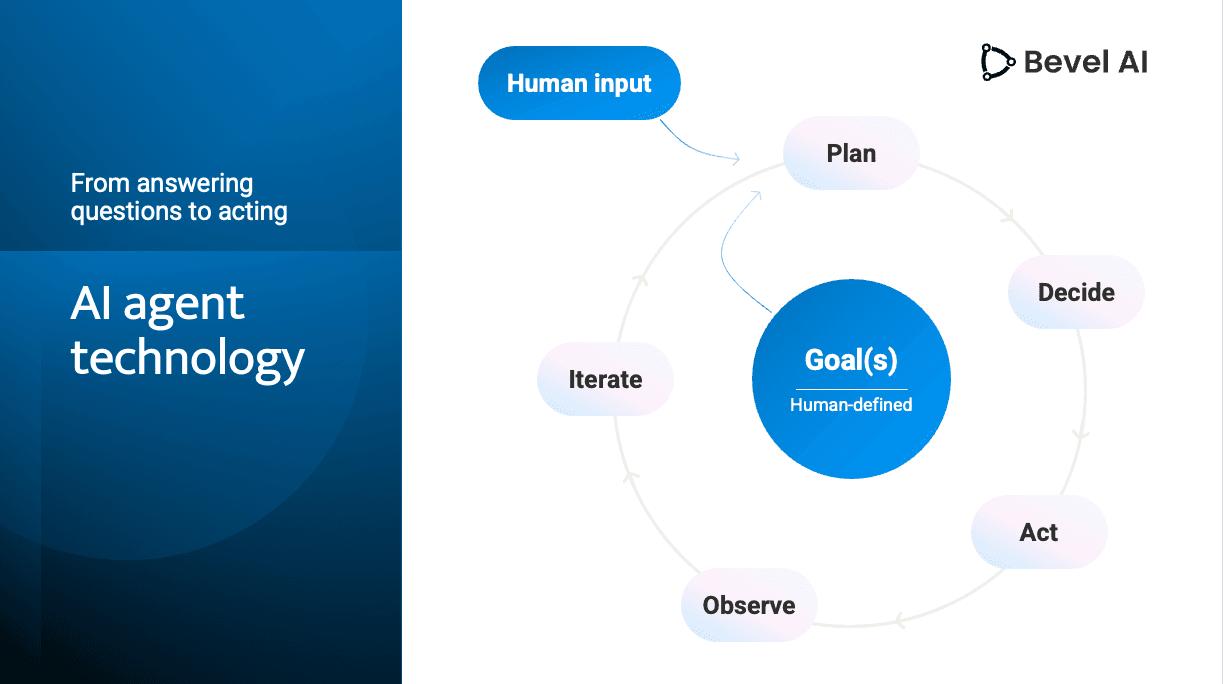
In Impact Learning, this means the AI agent acts as your co-creator. You define the goals — the topic, audience, structure, and style — and the agent plans, generates, and refines the course through an ongoing loop. At every step, you stay in control: reviewing, redirecting, and guiding the agent through natural conversation. The result is a collaborative workflow where human expertise and AI capability reinforce each other.
Plan
Co-plan and create learning content together with AI. There are many ways to communicate your goals and provide information to the AI agent:
- Type in chat — describe your goals, target audience, structure, and style directly in the conversation.
- Use voice input — speak to the agent using the built-in voice recognition system.
- Upload source documents — attach PDFs, presentations, or other materials that contain the content you want to teach.
- Start from a template — use one of the professionally designed templates as a foundation.
- Build your own template — accumulate knowledge and best practices from completed projects into a custom template that you refine over time.
You can iterate on your plan and communicate your goals for as long as needed. If you want to discuss the approach before anything is generated, simply ask the agent not to start generating until you're ready. The planning phase is yours to control — take the time to get the direction right before moving into production.
Live Preview
See your content in real-time as it's being generated
Templates
Start from professionally designed templates or build your own
Source Materials
Upload PDFs, images, videos, and other documents to guide the AI
AI Generation
Once you're happy with the plan, the AI agent gets to work. Based on everything you've communicated — your goals, source materials, template structure, and pedagogical instructions — the agent generates the course content, creates illustrations and visuals, and produces narration audio with subtitles. You stay informed throughout: the agent tells you what it's generating at each moment, and you can follow the progress in real time through the live preview.
Content Generation
Generate text, interactive elements, and complete learning experiences
Image Generation
Create custom illustrations and visuals with AI
Audio Narration
Add professional voice narration to your content
Iterate and Refine
Review, adjust, and improve your course through ongoing dialogue with the AI agent. Refine content, fix synchronisation, add interactivity, and localise — iterate as many times as needed until the result meets your standards. You can share your project with colleagues for view-only access, or create a review link so external stakeholders can preview the course and leave comments — all without needing an Impact Learning account.
Deploy and Share
When your course is ready, publish it directly from Impact Learning. You can deploy to the web with a shareable URL — either publicly or with restricted access — so learners can open the course in any browser without installing anything. If your organisation uses a Learning Management System, you can export the course as a SCORM package and upload it there. You can also embed the course in your own website or intranet. Whenever you make updates, simply republish — the URL stays the same, and learners always get the latest version.